
You are here: FinishLynx 13.10
FinishLynx 13.10
What's New
Auto-Focus
EtherLynx cameras equipped with a remote control lens now support the Auto-Focus functionality. To start Auto-Focus simply hold Ctrl+Shift and click either the Focus Near  or Focus Far
  button while in 2D EasyAlign mode.
TIP: Right-click and drag your mouse to draw a box around the region you want the focus to be centered from.
- For optimal results when using a C-Mount or mechanical iris F-Mount lenses:
- Check the AEC box.
- Open the iris as much as possible without overexposing the image.
- Hold Ctrl+Shift and click either the Focus Near or Focus Far button while in 2D EasyAlign mode.
NOTE: To stop Auto-Focus while in progress, either stop alignment mode or hit ESC.
Vision PRO X Enhancements
The Vision PRO X now supports:
- Video Display Module (VDM)
- Note: Requires 2026 hardware revision.
- EVF over HDMI (see Advanced - Other Settings below)
- Note: Requires 2026 hardware revision.
- Camera runtime environment update- automatic double-boot to update the camera when FinishLynx detects required firmware updates.
- BOOT LED behavior - solid Amber between initial boot (Red) and ready to connect (slow flash Amber)
General Improvements
Image
- Zoom out to 2% and 3% in image panes
- Zoom selectors for 1/2, 1/4, 1/8 image size on Image|Print and Image|Print to Bitmap dialogs.
-
Updated Finnish LNG
Capture
- Photoeye A capture method now supports the Pre-Cropped feature.
Scoreboard Improvements
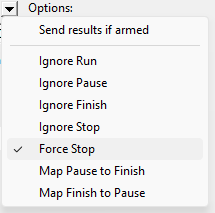
Force Stop
The Force Stop option, when checked, will cause the running time to stop as soon as results (Time field) are available. If Results are set to Auto (or Manual), they will appear immediately, even if you are not using a photoeye, or forgot to arm your photoeye.
|
|
Scripts
- Added Wavelight.lss
-
Add uTabLED_Wind.lss
- Added \13\10 'Length time' to ResultsHeader section
NOTE: Run FinishLynx as Administrator (right-click shortcut + Run As Administrator) for best performance.
ADVANCED - Other Settings
Additional Other (hidden) settings are included:
-
Event\Image\CacheSize increased to 100MB.
- Hardware\Ethernet\Display\EVFType 0=HDMI; 1=WiFi (5L700 only - requires reboot and restart)
- Hardware\Ethernet\Display\EVFIPAddr: sets the host IP address of the EVF-Wifi network.
- Hardware\Focus\AutoFocus includes multiple variables to control the Auto-Focus function.
-
Hardware\Remote\IrisCtrlOride overrides the automatic f-mount lens type detection for remote iris.